
🗑️
“I deleted the wrong files.”
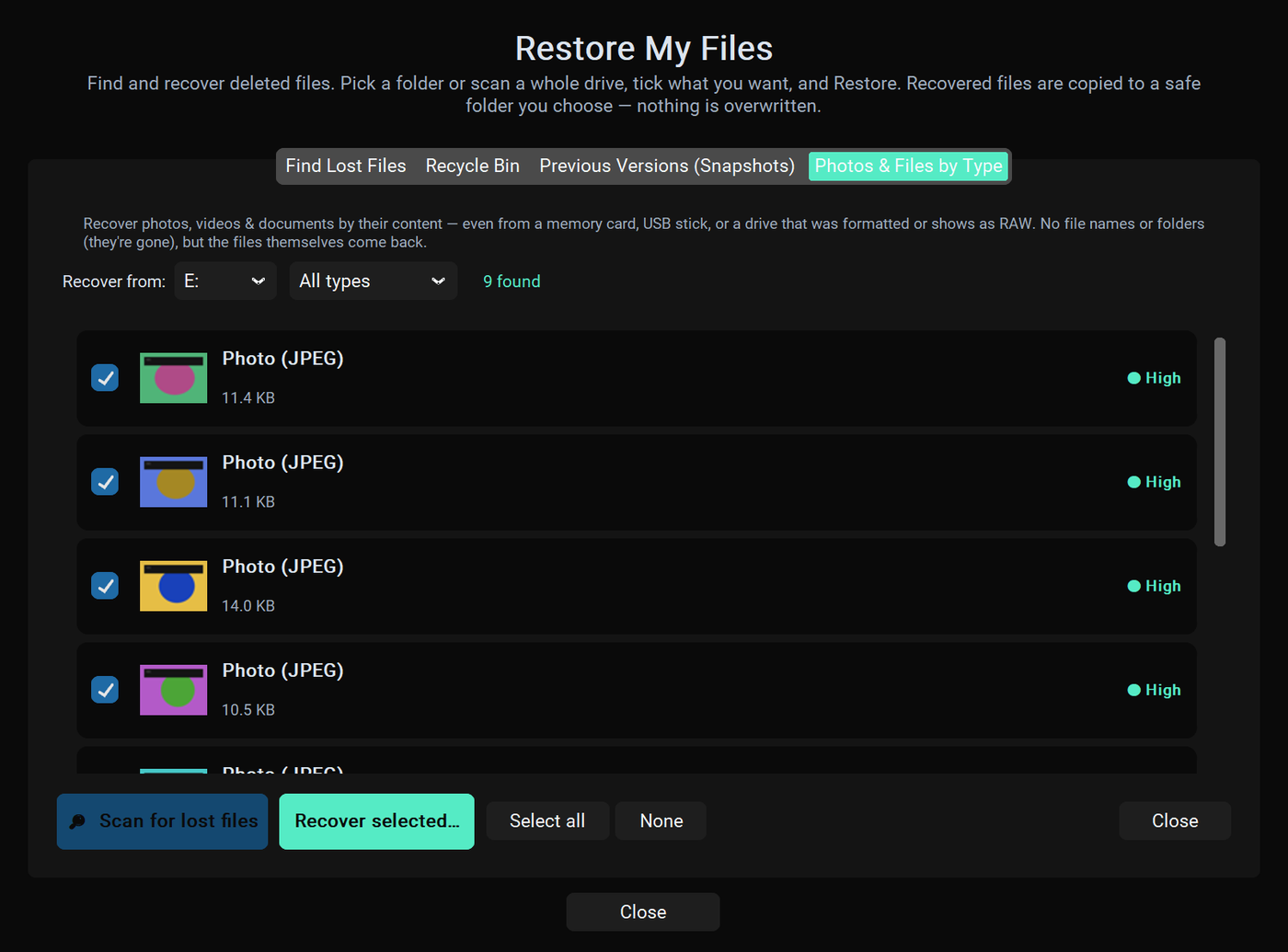
Photos, a project, the tax folder — emptied from the Recycle Bin or Shift-deleted. Rescue scans the drive and brings back what's still recoverable, with a clear chance rating on each file.
Windows rescue & repair, done right
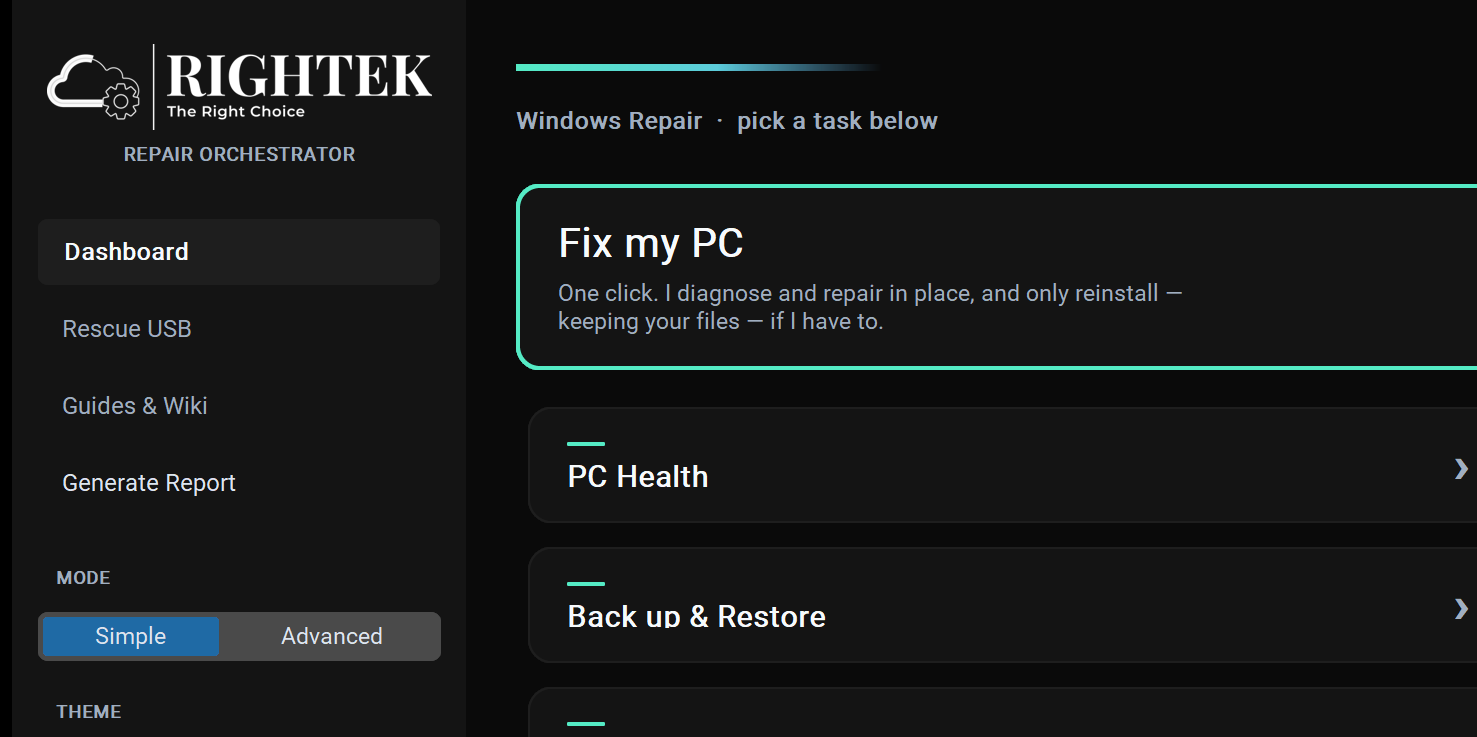
Rightek Rescue boots a computer that won't start, automatically figures out what's wrong, and repairs Windows in place — keeping your files, accounts, and apps. It can even rebuild Windows when there's nothing left to boot. No reinstall. No guesswork.
 Rightek Rescue — Command Center
–□✕
Rightek Rescue — Command Center
–□✕
The problem
Windows' own “Automatic Repair” shrugs — “Your PC couldn't be repaired.” Backup tools only help if you made a backup. And a reinstall wipes everything that mattered. Rescue takes a different path: it repairs the PC you already have.
Sound familiar?
If any of these have happened to you — or to someone who then called you — this is the tool that fixes it.
Photos, a project, the tax folder — emptied from the Recycle Bin or Shift-deleted. Rescue scans the drive and brings back what's still recoverable, with a clear chance rating on each file.
“Working on updates — don't turn off your PC,” for hours. Rescue clears the jammed update and gets Windows booting again, without wiping a thing.
Signed in and… nothing. No desktop, no taskbar. Rescue repairs the broken shell and sign-in so your desktop comes back.
A blue “your PC needs to be repaired,” or an endless “Automatic Repair” loop. Rescue boots from a USB, finds the real cause, and fixes it — files intact.
“We can't sign in to your account,” or a temporary profile where everything's missing. Rescue restores your real profile and gets you back in.
Connected, but no websites, no updates, no antivirus. Rescue clears the hijacks and broken network services so the web works again.
Seeing a different error — or an 0x code you don't recognize?
Try the free error checker →
It tells you the likely cause, whether it's software or hardware, and what to do.
Recovery the built-in tools can't do
Deleted the whole C:\Windows folder? Corruption so bad Windows won't even
try to repair itself? A failed update that left nothing to boot? Rescue reconstructs a fully
working Windows right on the drive — around your files, your accounts, and your programs.
No wipe. No starting from scratch.
The only tool that rebuilds Windows in place — even when the Windows folder is gone — without wiping your files, accounts, or apps.
| Can it… | Windows Reset / Repair |
WinPE tool kits |
Data-recovery shop |
Rightek Rescue |
|---|---|---|---|---|
| Fix a PC that won't boot at all | — | expert, by hand | ✓ | ✓ |
| Rebuild Windows when the Windows folder is gone | ✗ | expert, by hand | ✓ | ✓ |
| Recover deleted files & an emptied Recycle Bin | ✗ | separate tool | ✓ | ✓ |
| Pull your files off a PC that won't boot | ✗ | manual | ✓ | ✓ |
| Keep your files, apps & accounts — no wipe | wipes apps | manual | ✓ | ✓ |
| Auto-diagnose the fault & fix it | limited | all manual | skilled human | ✓ automatic |
| Do it yourself, at home, in minutes | ✓ | needs expertise | days · drop-off | ✓ |
| What it costs | free | free / varies | $100s–$1,000s | one license |
For logical failures — a PC that won't boot, corruption, deleted or lost files — Rescue does what a data-recovery shop does, automatically and in minutes, for the price of a license instead of a days-long, few-hundred-dollar bench job. The one thing to leave to a specialist is a physically failing drive (one that's clicking or dying) — and Rescue tells you honestly when that's the case, before anything makes it worse. Need that? Our team at Rightek IT Services does professional drive & data recovery too.
Watch it work
Boot the broken PC from the rescue USB and Rescue takes over. It reads what actually failed, repairs each fault in the right order, and tells you what it did in plain English — no commands to type, no guessing which of a dozen fixes to try.
Rightek Rescue — Live Recovery ConsoleWhat's inside
One product, three jobs: get the PC working again, rescue what's on it, and keep it healthy from here on.
Recognizes the real failure codes — the 0xc0000… boot errors, black screens, sign-in loops, “Working on updates” loops — and applies the specific fix, then explains it in plain English.
Rebuilds missing boot files and the boot configuration, restores a corrupt registry and missing system files, clears a stuck servicing update.
Fixes black screens, a hijacked or broken desktop, a Start menu & taskbar that won't load, and a user profile that won't sign in.
When Windows is beyond repair, Rescue reconstructs a working install in place — around your data — instead of a clean wipe.
Bring back deleted files and an emptied Recycle Bin — with a green/yellow/red chance of full recovery for each one.
Copy your files — Documents, Downloads, Pictures, Desktop — plus your accounts and programs off a dead or dying machine to a rescue drive, even when it won't boot.
When hardware forces a fresh start, lay down a clean Windows and bring the user's data and account back with it.
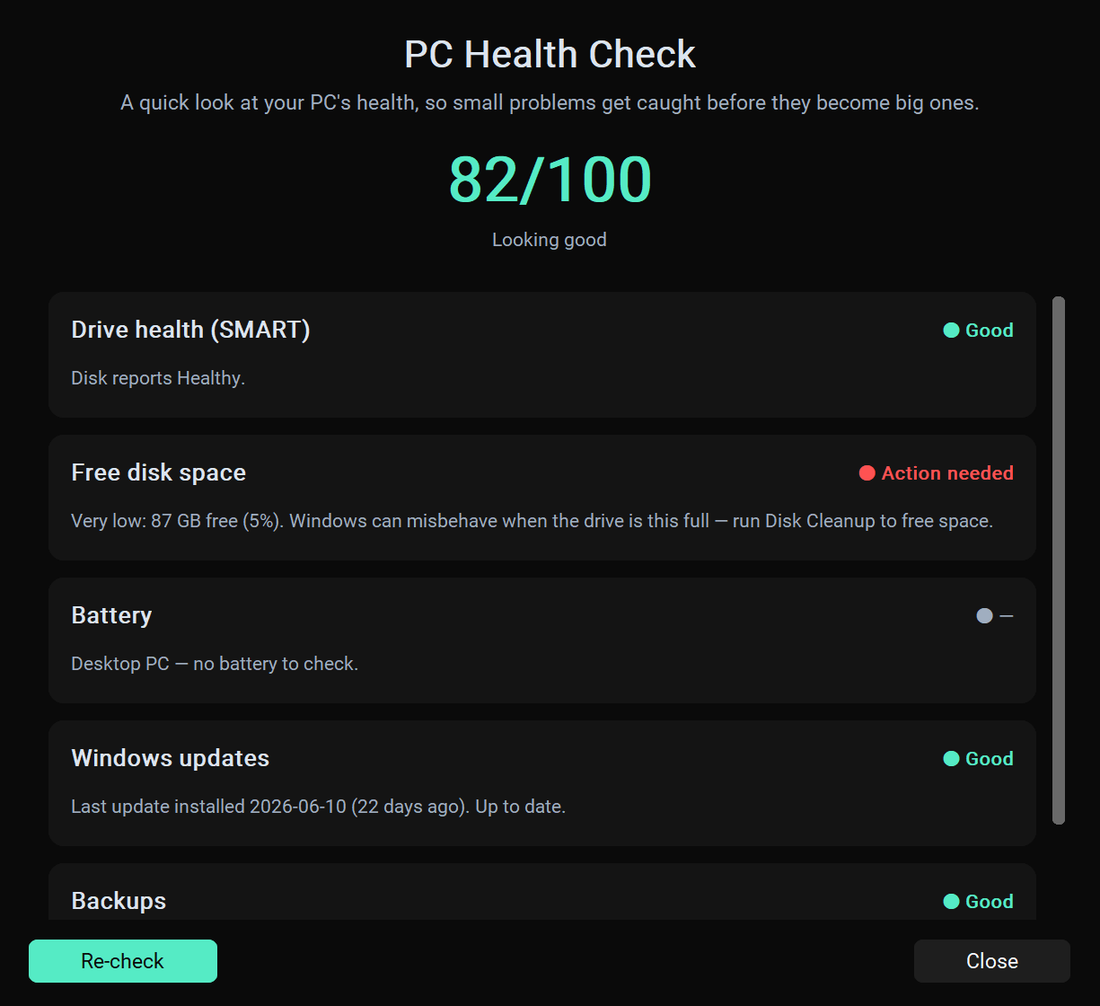
Drive health (SMART), free space, battery wear, update status, and backup status — a single at-a-glance score with plain-English actions.
Save a full image of your entire PC to a single file — then restore the whole machine, Windows and programs and all, in minutes. Your safety net for anything.
Set it once: Rescue keeps your Documents, Downloads, Pictures and Desktop copied to another drive on a schedule, so a failure can't cost you everything.
Turned on the day you install: daily restore points so you can right-click any file and “restore a previous version,” plus a healthy Recycle Bin that Windows can't silently empty. The best time to make a deleted file recoverable is before you delete it.
If the drive is dying, Rescue says so — back up and replace it. It won't pretend a hardware failure is a software fix.
…plus 30+ more technician tools under the hood — driver repair, BitLocker key backup, network & update fixes, BSOD crash analysis, offline password reset, and much more.
A real look
Every screen is one click, in plain English. Here's what you'll see.
See it at a glance
Rescue's PC Health check reads the drive, space, battery, updates and your backups, scores it out of 100, and tells you exactly what — if anything — needs attention. The same engine that rescues a dead PC quietly watches a healthy one.
It gets smarter every week
Rescue already fixes a huge range of Windows failures on its own. But if it ever meets a problem it hasn't seen before, it doesn't just give up. With your subscription it quietly sends the technical fingerprint of that failure back to our engineers — never your personal files. We build the repair, test it, and it lands on every copy of Rescue automatically. The problem that stumped it today is one it solves for everyone tomorrow.
You're not buying a tool that stops improving the day you download it — you're getting a repair team that keeps working behind it.
Hits a failure it can't fix yet? It sends us the error signature (codes and event logs — not your documents) so we can solve it.
Our engineers turn that real-world failure into a new, tested, automatic repair — the same day the reports come in.
Next time Rescue runs, it already knows the fix. It updates itself — no reinstall, no download to hunt for.
How it works
On any working PC, make a Rightek Rescue rescue USB — one click.
Start the broken PC from it (usually F12 / F11 / Esc at power-on).
Rescue auto-diagnoses and repairs — or rescues the data — and tells you what it did.
Who it's for
You don't need to be technical. Rescue is one-click for everyone, and a power tool for the pros. Nobody wants to lose their files, photos, and programs — this makes sure you don't.
Your photos, documents, work and installed programs matter. When Windows breaks, Rescue gets you back — files, apps and all — without a wipe and without a repair-shop bill. No tech skills needed.
The person everyone calls when a PC dies. Fix the whole family's machines without a reinstall, and keep your own backed up automatically.
Close more tickets faster, let junior techs handle senior jobs, and recover or restore at volume without wiping data. One tool instead of a shelf of them.
See it in action
We're putting Rescue up against the worst machines we can find — and you can throw one at us. Send a “broken” Windows image and watch us bring it back on camera. New videos as we launch.
A dead “Automatic Repair” loop, fixed start to finish — no reinstall.
Emptied Recycle Bin, Shift-deleted — recovered live.
You send the wreck, we try to fix it. Can it be beaten?
Pricing
Targeting a late September 2026 launch. Prices are indicative — join the waitlist for the download link and 20% off your first year.
$69.99/year
For your own PC
$129.99/year
For the whole household
$399.99/year
For repair shops & IT pros
🛡️ 30-day money-back guarantee. Try Rescue on your PC — if it doesn't help, email us within 30 days for a full refund. No risk.
FAQ
No — the whole point of Rescue is to repair without a reinstall, so your files stay put. We still recommend backing up whenever possible; repair always carries some risk, especially on a drive that's already failing.
Honestly, no — and any tool that promises otherwise is misleading you. On a modern SSD, Windows tells the drive to erase a permanently-deleted file within seconds (it's called TRIM), so the data can be gone before any recovery tool runs. Rescue recovers what's genuinely still there — recycle-bin and shift-deleted files, and it's straight with you about the odds on each one instead of handing back a broken file. That's exactly why Rescue also turns on a File Safety Net (restore points + a protected Recycle Bin) the day you install — so your next deleted file is one you can actually get back.
No. Rescue auto-diagnoses the problem and walks you through it in plain language. Technicians get the advanced tools too.
That's exactly what the rescue USB is for — build it on another working PC, boot the dead one from it, and Rescue takes over.
Yes — the rescue runs fully offline. (If it ever needs a genuine Microsoft file, those come straight from Microsoft.)
Rescue makes targeted, validated repairs and never overwrites your data. It's upfront about anything it can't fix in software — like a failing drive.
Windows 10 and 11 — both the in-Windows app and the offline rescue USB. Older versions aren't supported yet.
Fix-it guides
Free walkthroughs — the manual way and the one-click way — for the errors that bring a PC to its knees.
The one thing nothing else does: Windows destroyed, no wipe.
Emptied Recycle Bin or Shift-deleted — often still recoverable.
Your data's still there — pull it off without opening the PC.
“Preparing Automatic Repair” / “couldn't repair your PC.”
Blue Recovery screen — 0xc000000f / 0xc0000034.
Stop code 0x7B after an update or BIOS change.
The update loop that never finishes.
No desktop, no taskbar — just black.
Target launch: late September 2026
🎁 Early supporters get 20% off the first year
Leave your email and we'll send you the download link the day it launches — plus your 20%-off code. No spam, ever.
Prefer email? Write to [email protected]. By Rightek IT Services.
Bring a dead Windows PC back to life — with everything still on it.
Notify me at launch